Notice: session_start(): ps_files_cleanup_dir: opendir(/tmp/.priv) failed: Permission denied (13) in /homepages/24/d204534154/htdocs/test/connections/connect.php on line 49
Warning: session_start(): Session cache limiter cannot be sent after headers have already been sent (output started at /homepages/24/d204534154/htdocs/test/connections/connect.php:49) in /homepages/24/d204534154/htdocs/test/connections/connect.php on line 49
Warning: Cannot modify header information - headers already sent by (output started at /homepages/24/d204534154/htdocs/test/connections/connect.php:49) in /homepages/24/d204534154/htdocs/test/prodInfoWord.php on line 52
Warning: Cannot modify header information - headers already sent by (output started at /homepages/24/d204534154/htdocs/test/connections/connect.php:49) in /homepages/24/d204534154/htdocs/test/prodInfoWord.php on line 53
Warning: Cannot modify header information - headers already sent by (output started at /homepages/24/d204534154/htdocs/test/connections/connect.php:49) in /homepages/24/d204534154/htdocs/test/prodInfoWord.php on line 54
Warning: Cannot modify header information - headers already sent by (output started at /homepages/24/d204534154/htdocs/test/connections/connect.php:49) in /homepages/24/d204534154/htdocs/test/prodInfoWord.php on line 55
Warning: Cannot modify header information - headers already sent by (output started at /homepages/24/d204534154/htdocs/test/connections/connect.php:49) in /homepages/24/d204534154/htdocs/test/prodInfoWord.php on line 56

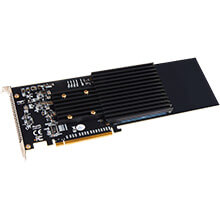
Sonnet M.2 4x4 PCIe Card (Silent)
Download Images (.zip file)
ProdCode: SONFUSSSD4X4E3S
Four M.2 NVMe SSD Slots On a PCIe 3.0 x16 Card for Mac and Windows (Silent)
Features
- Four M.2 NVMe SSD Slots On a PCIe 3.0 x16 Card for Mac and Windows (Silent)
- Add up to 8TB Ultra-fast Storage - Mounts up to four M.2 NVMe SSDs (sold separately) in an x16 PCIe slot.
- High-Performance PCIe Interface - PCI Express 3.0 x16 host bus interface plus x16 PCIe bridge; four lanes of PCIe 3.0 bandwidth devoted to each installed SSD.
- Superior Performance - Achieve sustained RAID 0 speeds up to 11,700 MB/s.(3)
- RAID Support - Supports macOS, Windows, and Linux RAID 0, 1, and 5 (macOS RAID 5 support requires SoftRAID software, sold separately).
- macOS Boot Support - Supports booting from a single (non-RAIDed) attached SSD.
- No Thermal Throttling - Custom cooling solution enables installed SSDs to maintain high performance during very large file transfers.
- Optimized for Thunderbolt - Use in Sonnet Thunderbolt 3 expansion systems to connect up to four SSDs through one cable with performance up to 2750 MB/s.
- NVMe Compliant - Typically no drivers required.(4)
- S.M.A.R.T. Operation - Supports S.M.A.R.T. (Self-Monitoring, Analysis and Reporting Technology) data reporting.
Mac Compatibility
- Mac Pro® 5,1(6) (Mid 2010 & Mid 2012) with available full-length x16 PCIe slot
- Mac Pro 7,1 (2019) – Use x16 PCIe slot (slot 3, 4, or 5) for full performance
- macOS® 10.13.6+(7)
- macOS Catalina compatible
Windows Compatibility
- Computer with available full-length, full-height x16 PCIe slot (PCIe bifurcation not required)
- Windows 10 (64-bit Edition Version 1809 or greater)
Linux Compatibility
- Computer with available full-length, full-height x16 PCIe slot (PCIe bifurcation not required)
- Linux Kernel 5.0+
Thunderbolt Compatibility
- Mac computer with Thunderbolt 3 or Thunderbolt 2 ports via a Thunderbolt 3 or 2 to PCIe card expansion system with available full-length x16 PCIe slot
- Windows computer with Thunderbolt 3 ports via a Thunderbolt 3 to PCIe card expansion system with available full-length x16 PCIe slot
- Linux computer with Thunderbolt 3 ports via a Thunderbolt 3 to PCIe card expansion system with available full-length x16 PCIe slot
Install up to Four M.2 NVMe SSDs into a PCIe Card Slot
Ultra-speed Data Transfers
If you need to add internal storage to your computer and ultra high-speed data transfers are critical to your work, you need an NVMe SSD-based upgrade. Individually, M.2 NVMe PCIe SSDs offer tremendous performance, but Sonnet’s M.2 4x4 PCIe Card enables you to mount up to four of them(1) into a single x16 card slot and combine their performance. No matter how you use it, this card can transform the way you work.
Mac Pro RAID 0 Performance
Install the M.2 4x4 PCIe card with your SSDs into your 2019 Mac Pro to achieve superior storage performance. If you’re one of the many still using 2010 or 2012 Mac Pro, install the Sonnet card plus SSDs to obtain performance you never thought possible.
Full Performance Design – Sonnet Advantages
Sonnet’s M.2 4x4 PCIe Card is a full-height, full-length PCIe 3.0 card with a 16-lane (x16) interface, designed to support full performance from four SSDs. Unlike “similar” adapter cards, Sonnet's M.2 4x4 card features:
- x16 PCIe Bridge
Devotes four lanes of PCIe 3.0 bandwidth to every SSD you install (instead of limiting the x4 bandwidth to two SSDs at a time)
- Self-contained
Card doesn’t require a specific motherboard to operate or specific SSDs to support RAID features
- Universal Compatibility
Mac, Windows, and Linux compatible
- M.2 PCIe SSD Support
Works with a wide variety of M.2 NVMe PCIe SSDs
Silent and Cool Running
No Slowdowns. No Thermal Throttling
SSDs heat up significantly when performing very large file transfers. This presents a problem for most competing cards, as they provide inadequate cooling for this task and allow installed SSDs to activate their built-in thermal throttling protection feature—thermal throttling drastically cuts SSDs’ performance while allowing them to cool. Sonnet designed the M.2 4x4 PCIe Card with a silent cooling solution to prevent thermal throttling, enabling SSDs to maintain their high performance at all times.
Thunderbolt Port? Connect Four SSDs Through One Cable
Got a Thunderbolt connection, but no PCIe card slot? Sonnet’s M.2 4x4 PCIe Card is ideal for use in one of our Thunderbolt 3 expansion systems that accept full-length PCIe cards. The combo enables you to add up to four SSDs to any Mac computer with Thunderbolt 2 or Thunderbolt 3 ports, or Windows or Linux computer with Thunderbolt 3 ports.(5)
Simple and S.M.A.R.T
Integrating a Sonnet M.2 4x4 PCIe Card into your system is easy—NVMe compliance ensures the necessary drivers(4) are installed automatically. The M.2 4x4 uses the operating systems’ built-in drive formatting utilities to format the SSDs. SSD health monitoring is supported through S.M.A.R.T. (Self-Monitoring, Analysis and Reporting Technology) data reporting, too.
- You may install fewer than four SSDs now and add more later without needing to reformat existing ones. Only 2280 (80mm—the most common length) length M.2 SSDs and with memory components on only the top side are supported. M.2 SSDs longer or shorter than 80mm don’t fit. M.2 SSDs with components on both sides don’t fit.
- SSDs attached to the Sonnet card appear to macOS as external drives. Booting from an external SSD in macOS 10.14.6+ requires enabling external booting in the security preferences that can be set in a command-R (recovery system) boot.
- This product’s performance will vary based on the type and number of SSDs used, the CPU speed (for RAID), and the PCIe architecture.
- Use of Samsung SSDs in computers running Windows requires the download and installation of NVMe drivers from Samsung; Microsoft Windows inbox NVMe drivers do not support Samsung SSDs.
- Performance in a Thunderbolt 3 PCIe expansion chassis limited by maximum Thunderbolt 3 PCIe bandwidth of 2800 MB/s. PCIe bandwidth of Thunderbolt 2 is about half of Thunderbolt 3.
- Mac Pro 5,1 requires a recommended Metal-compatible graphics card for macOS 10.4 (Mojave) and later.
- macOS 10.14.6+ supports both 512 and 4k block size SSDs, but macOS 10.13.6 supports only 4k block size SSDs. Today, most SSDs are shipped from the factory programmed with a 4k block size. If your SSDs are programmed with 512 block size, however, and you need to be compatible with macOS 10.13.6, you will need to reprogram your SSDs to a 4k block size. See this tech note for more details.
- RAID 5 support under macOS requires third-party software such as SoftRAID, sold separately.
In the box:
- Sonnet M.2 4x4 PCIe Card (Silent)
- Drive mounting screws
- Documentation